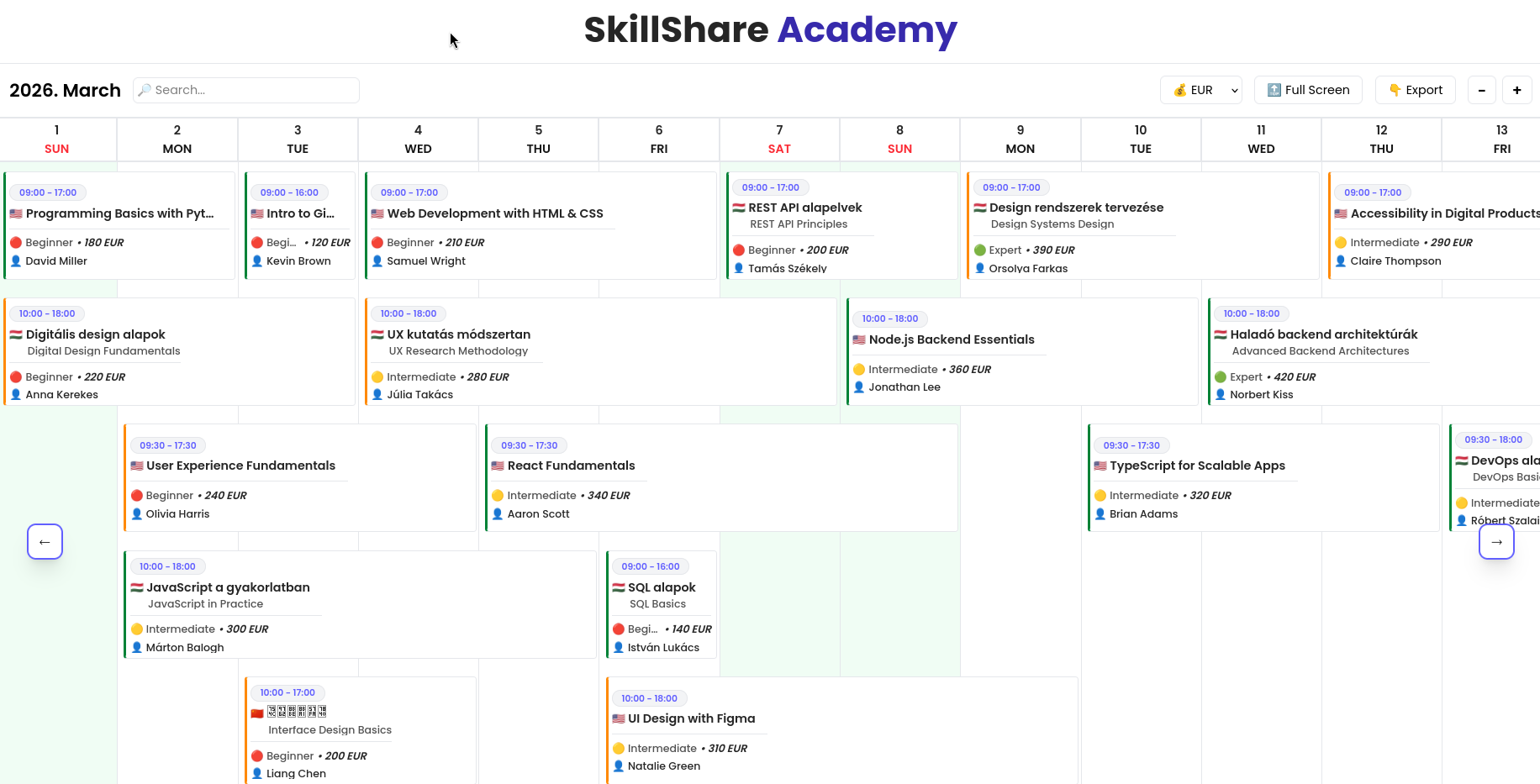
Euroskills Düsseldorf 2027 Hungary Frontend Dashboard Implementálás
Actions
- The search bar is debounced (300 ms). It searches every relevant field of the course, and only the found courses are shown when the user searches. However, the courses do not shift from their original position. Please refer to the video example.
- Currency Selector: The user can choose from EUR, HUF, and CYN. After selecting a currency, the price of the course cards is displayed in that currency. You can find a currencies.json file displaying the value of 1 EUR; use this file for exchanges. The selected currency is restored after refreshing the page or reloading the browser.
- Full Screen: This button toggles the chart to full-screen mode. While full-screen mode is active, the browser and OS controls are invisible. Pressing the "ESC" key exits full-screen mode.
- Export: This option exports the courses (ordered by start date) into a CSV file. The EUR currency should always be used in the export. The export should contain every attribute, with the field names on the first line. The exported CSV file can easily be imported into Excel.
- The +/- buttons: Clicking these buttons zooms in or out on the chart. See the video for an example. However, it is impossible to click these buttons indefinitely. After shrinking or zooming to the maximum extent, the buttons should be disabled. You may define this "maximum" value with a good UX mindset. The cards should not jump when zooming; there should be a smooth transition.
Keyboard Shortcuts
- Ctrl D: Highlights the search bar
- Ctrl +: Zooms in the chart (same as + button)
- Ctrl -: Zooms out the chart (same as - button)
- Ctrl E: Export
- Ctrl B: Fullscreen
- Left Arrow: Scrolls left
- Right Arrow: Scrolls Right
- Státusz
- Aktiv
- Elérési útvonal
- https://es2027-s17-r1-127-phase-2.netlify.app/
- Felhasznált technológiák
- ReactTailwind CSS
- Hozzájárulók/Kisegítők
-
- Leírás
Kalendár nézetű Dashboard panel, amely speciális eszközökkel rendelkezik.